
Enable Bcachefs Rollback
Bcachefs is basically quite similar to the Btrfs we know, and if you want to learn more about it, you can read here: Bcachefs Filesystem
Currently, there’s no clear explanation online for how to take snapshots of the / directory system in bcachefs,
so we can now enable snapshots for bcachefs by running the bcachefs-rollback hook of mkinitcpio for initramfs.
Thanks to @bathtime for coming up with this method ❤️
Let’s proceed
Section titled “Let’s proceed”First, we need to git clone this source before proceeding.
cd /tmp/ && git clone https://github.com/RengeOS/Bcachefs-Rollback-InitramfsNext, we will install it by building it from source code with makepkg -si.
cd Bcachefs-Rollback-Initramfs/ && makepkg -siAfter the package build and installation process is successful, our task is to restart the entire system.
# you can replace reboot to 'systemctl reboot' if not workingrebootHow to use Bacachefs Rollback
Section titled “How to use Bacachefs Rollback”- After restarting following the first time you enable
Bacachefs Rollback, you will encounter something like this.
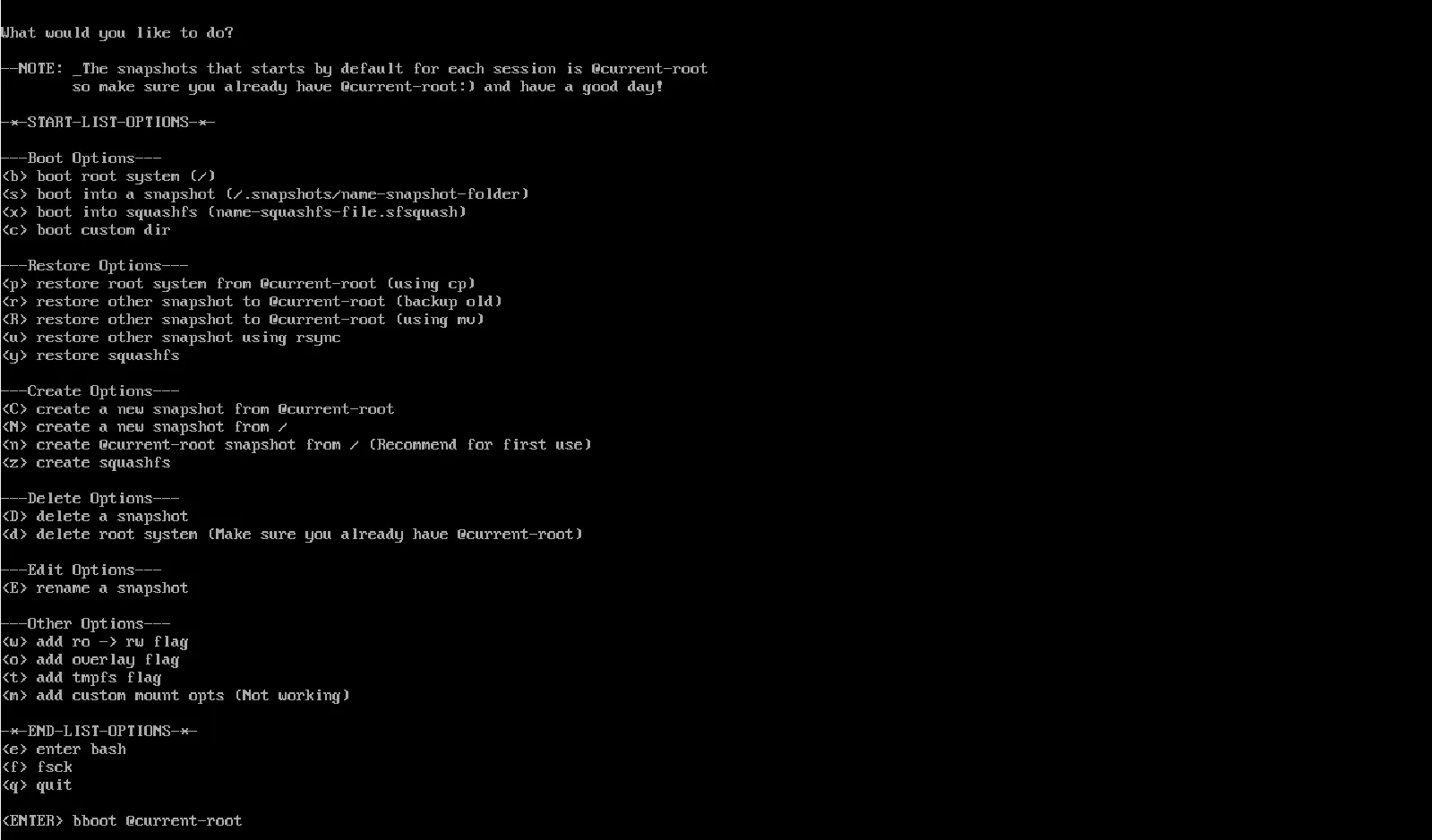
- Now, the first thing you need to do is press [n] to create
@current-rootbased on your/and located in the/.snapshotsdirectory. - Next, press the [enter] button to boot into the
@current-rootyou created earlier, and I will explain aboutBcachefs Rollbacklater.
Options in Bacachefs Rollback
Section titled “Options in Bacachefs Rollback”---Boot Options---
Section titled “---Boot Options---”[b] boot root system: Allows direct booting into the/partition.
[s] boot into a snapshot: Allows you to boot into the created snapshot you want in/.snapshots/. Simply enter the information on the listed created snapshot and you will boot into that snapshot.
[x] boot into squashfs: Allow booting into the createdname.sfsfile, usually located in/.
[c] boot into custom dir: This allows you to boot into the created snapshot with your desired path, and by default you will be at/.
---Restore Options---
Section titled “---Restore Options---”[p] restore root system from @current-root (using cp): Allows you to restore/from the@current-rootsnapshot using thecpcommand, and you will be able to boot into/instead of just the@current-rootsnapshot.
[r] restore other snapshot to @current-root (backup old): This allows you to select the snapshot that was created as the primary snapshot, which will become the@current-rootand will also back up the previous@current-rootto@previous-rootfor safety in case you need to return to it later.
[R] restore other snapshot to @current-root (using mv): Allows you to select the snapshot that was created as the primary snapshot, which will become the@current-rootusingmvcommand.
[u] restore other snapshot using rsync: Honestly, I haven’t tried this feature yet, so I can’t tell how it works :( but I’ll try it in the future.
[y] restore squashfs: Honestly, I haven’t tried this feature yet, so I can’t tell how it works :( but I’ll try it in the future.
---Create Options---
Section titled “---Create Options---”(Everything will be finished soon!)